Prepare your documents before ChatGPT or other AI
Summarizing a file, drafting a reply, analysing a statement: AI is genuinely useful, but the document often holds your clients’ information. Anonyma helps you remove it on your own computer, before the document goes to an online AI service.
Windows 10 and 11 · English and French · No credit card
Why do it first
Once text is sent to an outside service, you no longer control where it is kept or how it is used. Yet most uses of AI do not depend on knowing who the document is about: a summary or a rewrite works just as well without the client’s name, SIN or account number. The right time to remove them is before you send.
Two ways to prepare the document
A cleaned PDF copy
The hidden text is removed from the file, along with properties, comments and attachments. Scanned pages are rebuilt as images. You give this copy to the AI tool, never the original.
A de-identified text
With “Export de-identified text”, each hidden item becomes a consistent label, such as [Person 1] or [Account 1]: the same person keeps the same label, so the AI can follow who is who. Scanned pages are read by text recognition.
In the de-identified text, only the items you hid are replaced: another mention of a name you did not hide stays in the text. Use search to find every copy of a name before exporting, then read the text over before you paste it: Anonyma does not check it again after saving.
How it works
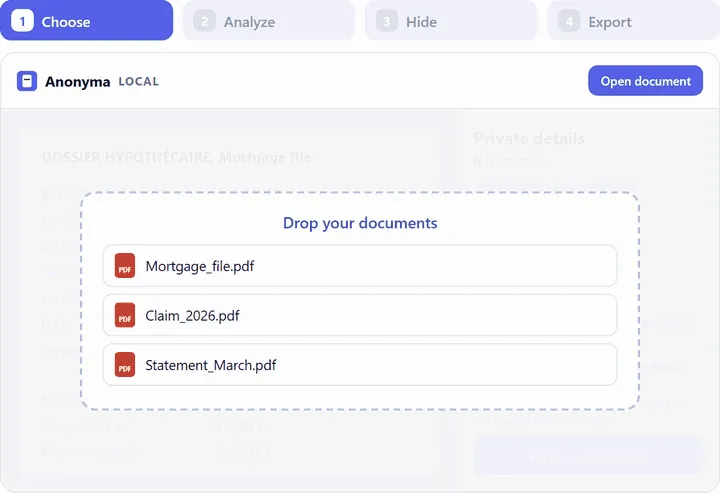 01
01Open the document
A PDF, scan, Word, Excel or PowerPoint file, e-mail or image, read on your computer.
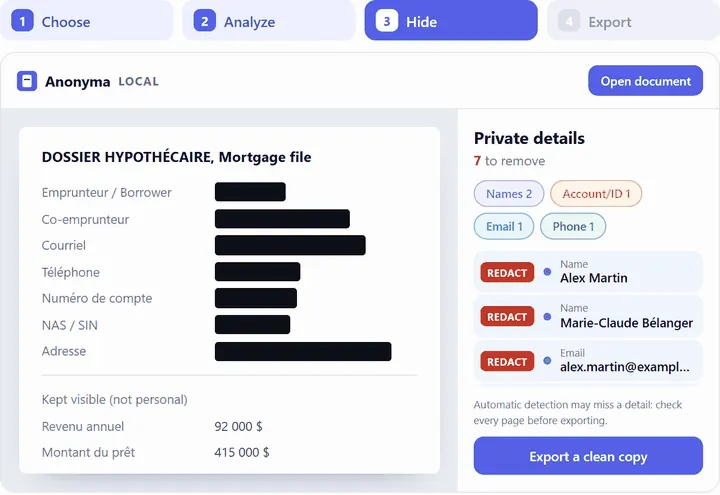 02
02Check every page
Anonyma suggests the names, numbers and addresses to hide. Search for the names you know are there, too.
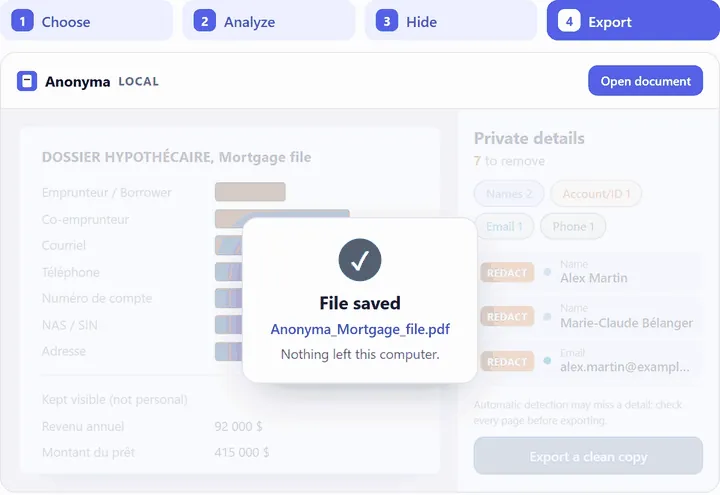 03
03Export, then use AI
A cleaned PDF copy or a de-identified text: that is the version you give to the AI.
Images: demonstration with fictitious data.
What Anonyma does not do
- Anonyma does not connect to any online AI service and sends nothing to ChatGPT, Claude or Gemini. You choose what you submit, and to which tool.
- It does not decide what your organization allows you to share: follow your own rules and professional obligations.
- It does not make a document certainly anonymous. When it exports the PDF copy, it points out dates and ages that remain, because they can help identify a person.
Anonyma is not affiliated with OpenAI, Anthropic or Google. These tools are named as examples only.
Limits to keep in mind
- Automatic detection can miss things. Read the cleaned version over before you give it to the AI.
- Context can still point to a person: a place, a date or a job title can be enough.
Read also: how to clean documents before using ChatGPT or Claude and local AI or online AI.
Common questions
Does Anonyma send my document to an AI?
No. Anonyma’s AI is installed with the software and runs on your computer. Nothing is uploaded, to us or to an AI provider.
Does it work with Claude, Gemini or Copilot?
Yes. The cleaned copy is an ordinary PDF file and the de-identified text a plain text file: you use them with the tool of your choice.
Can my team learn to do this?
Yes. We offer a short, free awareness session on preparing documents before AI, in English or French. Ask for a presentation
Try Anonyma on your own documents
Seven days free, no credit card, on one Windows 10 or 11 computer. For a team, let’s talk.
Plans and prices are on the Get a key page. Security and limits are described on the Security page.