How it works
 01
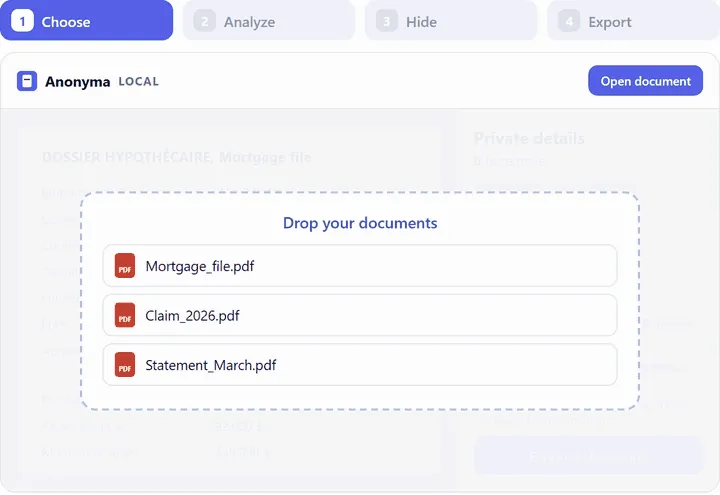
Open your documents
A PDF, scan, Word, Excel or PowerPoint file, e-mail or image: everything is read on your computer.
 02
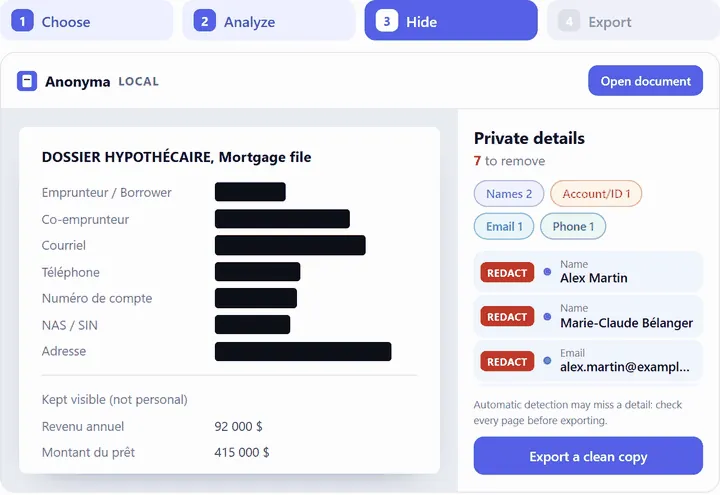
Check every page
Anonyma finds names, SINs, addresses, account numbers, e-mails, phone numbers and much more. Keep, remove or add whatever you want, then confirm each page.
 03
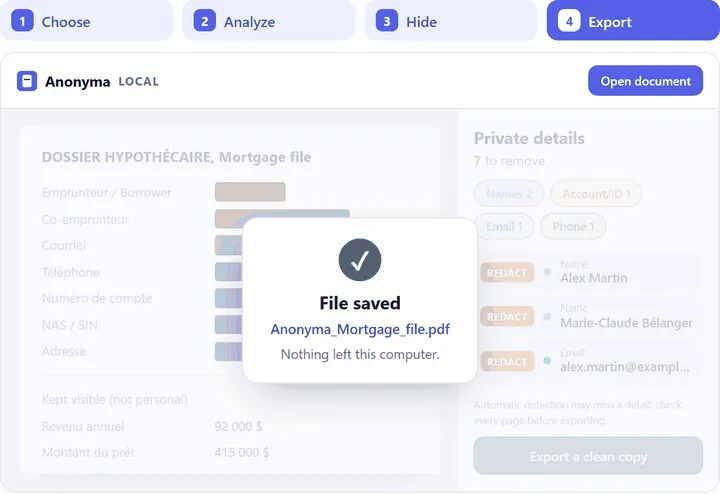
Export a cleaned PDF copy
A new file, without the hidden text. Your original stays as it was.
Images: demonstration with fictitious data.
Right-click in File Explorer: “Anonymize with Anonyma” opens the document. Coming: a Chrome and Edge extension and an Outlook add-in. Integrations
Why Anonyma
Your documents stay on your computer
Nothing is uploaded. The internet is used only for the licence and updates, never for your documents.
Anonyma finds what to hide
In English and French: names, SINs, addresses, account numbers, e-mails and phone numbers, as well as RAMQ and Ontario (OHIP) health cards, and Quebec and Ontario driver’s licences, and much more. And it learns from you and your documents: your forms and your choices are recognized next time.
A clean copy that you review
You confirm every page before exporting. The hidden text is taken out of the file, not just covered, along with hidden copies: properties, comments, attachments. See security and limits
Anonyma learns from you
The more you use it, the more Anonyma adapts to your documents. It remembers your forms, the words to hide and the ones to keep visible, then applies them next time, as you choose. Everything stays on your computer, and anything learned can be forgotten at any time.
Try Anonyma
Leave your e-mail to try Anonyma. We will contact you.
For organizations
Licences for your whole team, and a short free awareness session to prepare your documents before using AI. Our solutions for organizations