Anonymize a PDF without uploading it
Anonyma finds the personal information in a PDF right on your computer. You review every page, then export a new copy in which the hidden text is removed from the file, not just covered. Your original stays as it was, and nothing is uploaded.
Windows 10 and 11 · English and French · No credit card
How it works
 01
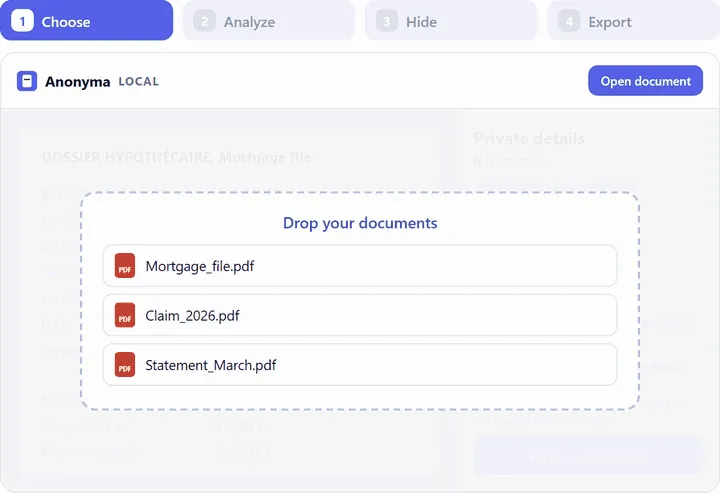
01Open your PDF
A typed or scanned PDF, or several at once. It is read on your computer; nothing is uploaded.
 02
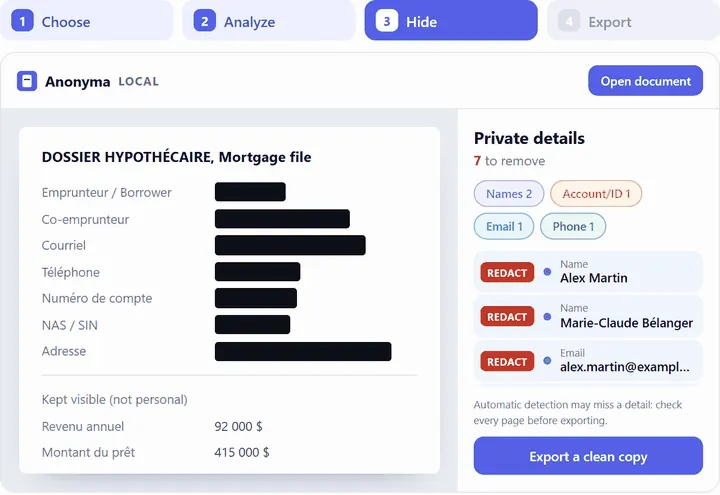
02Check every page
Anonyma suggests what to hide. Keep, remove or add whatever you want, then mark each page as reviewed.
 03
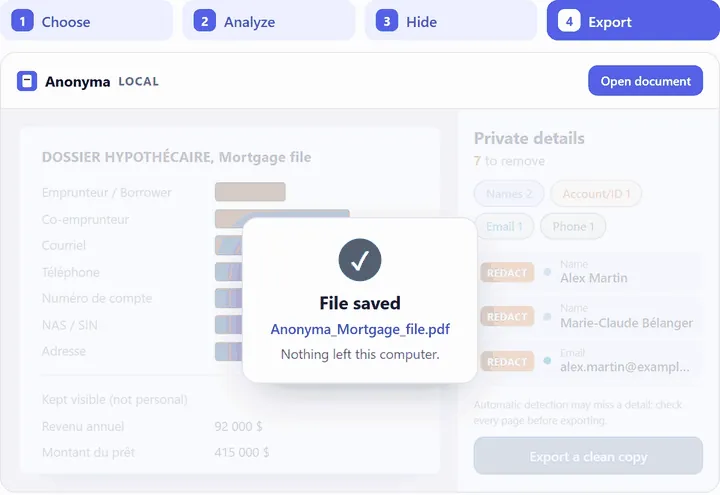
03Export a cleaned copy
A new PDF, without the hidden text. Your original is not changed.
Images: demonstration with fictitious data.
What Anonyma finds in a PDF
Anonyma uses rules and AI models installed with the software, in English and French, for Canadian and US formats:
- Names
- Addresses
- SINs
- Account and policy numbers
- Health cards (RAMQ, OHIP)
- Dates of birth
- E-mail addresses
- Phone numbers
- Postal codes
- Handwritten signatures
- Photos of people
- Barcodes and QR codes
- Quebec and Ontario driver’s licences
- and more
Detection can miss a detail. You can search the whole document for any name or number and hide every copy in one click, or draw an area to hide yourself.
What the exported copy contains
Removed, not covered
The hidden text is taken out of the file. Anonyma does not export a black box laid over text that is still there.
Hidden copies removed
Document properties, comments, attachments, bookmarks, form fields, scripts and page thumbnails are removed.
Invisible text too
White text on a white page or text under a picture is still in the file. Anonyma reads it, tells you about it and removes it from the copy like the rest.
A checked copy
After export, Anonyma reads the copy again to confirm that the items you hid are gone, and points out dates and ages that remain.
A clean file name
By default, the copy is named “ANONYMA_” followed by the original name. If that name contains something you hid, such as a person’s name, it is removed.
A report, if you want one
You can add a short report that sums up what was hidden, by category, without repeating the hidden text.
Anonymize or redact?
Anonyma removes the information you choose to hide: that is redaction. A document is only truly anonymous when nothing can point to the person any more, context included: a place, a date or a job title can be enough. Anonyma cannot promise that outcome for you, which is why you review every page before you share the copy.
Limits to keep in mind
- Automatic detection can miss things. You remain responsible for what you share.
- The size of a box can hint at the length of the hidden word.
- Context can still point to a person.
Read also: redaction, pseudonymization, anonymization and why a black box isn’t enough.
Common questions
Is my PDF uploaded?
No. Anonyma reads, analyses and exports the document on your computer. The internet is used only for the licence and updates, with no document content.
What about Word, Excel or PowerPoint files?
Anonyma opens them too, along with e-mails (.eml, .msg) and images. The cleaned copy is always a PDF: for a Word, Excel or PowerPoint file, it keeps the text but not the original layout.
Can I process several PDFs at once?
Yes, with Pro and during the trial: open several documents, review them one by one, then export them together, into a folder or a ZIP file.
Does the copy stay searchable?
Usually yes for typed pages: only the hidden text is removed. When it is safer, Anonyma rebuilds a page as an image, for example a scanned page or a page where removing text would touch visible text; in some cases the whole document is exported as images.
Try Anonyma on your own documents
Seven days free, no credit card, on one Windows 10 or 11 computer. For a team, let’s talk.
Plans and prices are on the Get a key page. Security and limits are described on the Security page.