Scanned PDF anonymization
A scanned contract, a photographed form, a faxed statement: to a computer, every page is a picture. Anonyma reads it on your computer with text recognition (OCR), suggests what to hide, then produces a copy in which the hidden areas are part of the image.
Windows 10 and 11 · English and French · No credit card
How Anonyma handles a scan
Read on your computer
Text recognition runs on your computer, with no upload. A scanned page can take from a few seconds to a minute, depending on your computer.
More than text
Besides names, numbers and addresses, Anonyma finds handwritten signatures, photos of people, barcodes and QR codes.
Hard pages flagged
A scanned page that is hard to read shows a warning: check it closely, or hide what is needed yourself.
Rebuilt as an image
In the copy, each scanned page is rebuilt as an image: the hidden areas are part of the picture, and the hidden text layer of “searchable” scans does not come along.
Read again after export
After export, Anonyma reads the pages again with text recognition and reports any hidden item that would still be readable.
Your original untouched
The copy is a new PDF file. The original scan is not changed.
When the reading struggles
A blurry, faint, tilted or faxed scan is harder to read, and a misread name can slip past detection. You stay in control:
- search the recognized text for a name or number, then hide every copy in one click;
- draw an area to hide by hand, anywhere on the page;
- turn a page that is the wrong way round by 90 degrees; the copy keeps it that way;
- follow the guided review, which shows you each item, then each page.
For better results, scan cleanly: 300 dpi is a common setting for text, with straight, complete pages.
How it works
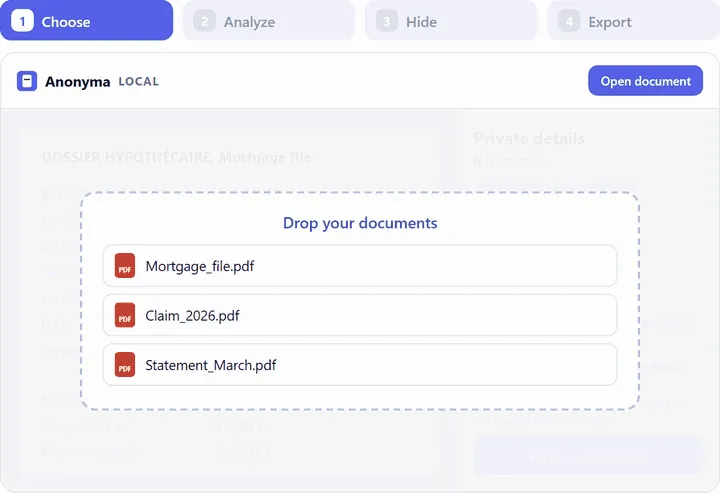 01
01Open the scan
A scanned PDF or an image (PNG, JPG, TIFF), read on your computer.
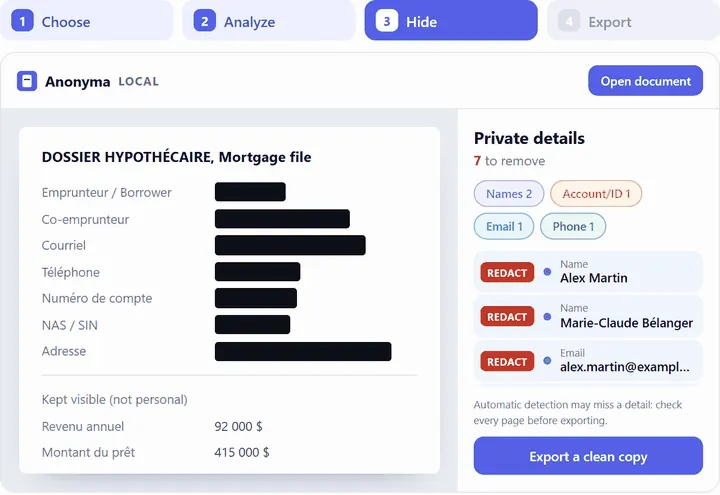 02
02Check every page
At a zoom where small print is readable: headers, footers, stamps and handwritten notes.
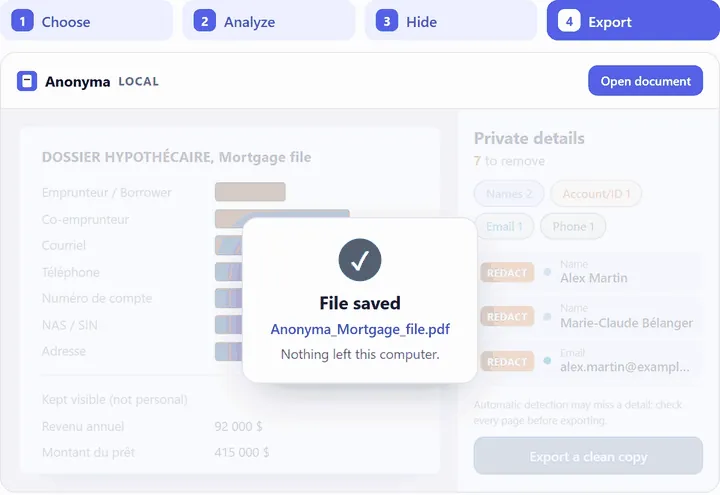 03
03Export a cleaned PDF copy
Scanned pages are rebuilt as images, then read again.
Images: demonstration with fictitious data.
Limits to keep in mind
- Text recognition can misread a poor scan, and automatic detection can miss things. Review every page.
- Scanned pages in the copy are images: their text is no longer searchable.
- Context can still point to a person: a place, a date or a job title can be enough.
Read also: how to redact a scanned document.
Common questions
Is my scan sent to an online OCR service?
No. Text recognition is part of the installed software and runs on your computer. Nothing is uploaded.
Can I anonymize a photo of a document?
Yes. Anonyma opens images such as PNG, JPG and TIFF, and the cleaned copy is a PDF.
What about a PDF that mixes typed and scanned pages?
Anonyma reads each page according to its content. Scanned pages are rebuilt as images; typed pages usually keep their text searchable, except the hidden text.
Try Anonyma on your own documents
Seven days free, no credit card, on one Windows 10 or 11 computer. For a team, let’s talk.
Plans and prices are on the Get a key page. Security and limits are described on the Security page.