Offline redaction: your documents stay on your computer
Anonyma is Windows software, not an online service. Opening files, reading scans, detection, review and export all happen on your computer. No document is uploaded, to us or anyone else.
Windows 10 and 11 · English and French · No credit card
What happens on your computer
No upload
Anonyma has no upload button and no document-processing server. We cannot see your documents: they never reach us.
The AI is installed with the software
The AI and text-recognition models are part of the software. None is downloaded while you work, and your documents are not used to train them.
Protected reading
Anonyma reads documents in a separate, locked-down Windows process that Windows gives no network access and no access to your folders.
A copy where you want it
The cleaned copy is a new file, saved in the folder you choose. Your original is not changed.
What goes over the internet
Anonyma connects to the internet only for the reasons below. None of these connections carries a document, content, file name or value found.
- Licence: when you activate it, then at start-up and every few hours while it is open, Anonyma sends your licence key, an anonymous identifier of the computer and the app version.
- Free trial and lost key: only when you ask for them, with the e-mail address you enter.
- Updates: at start-up, a small signed notice says whether a new version exists. It is downloaded only if you choose to install it.
Anonyma sends no usage statistics and no crash reports. Details: what goes over the internet and the privacy policy.
How long can it work without a connection?
Document work does not need the internet: you can open, review and export with no connection. The licence, however, must be confirmed online at least every 7 days. After that, Anonyma stops opening new documents until it can reconnect; documents already open can still be exported.
Activation and starting the trial need a connection. For a computer that can never reach the internet, write to us: a licence that needs no reconnection can be discussed.
For your IT department
Your IT team can check this for itself: running Anonyma behind a firewall, it should see no connection during document work. It can also turn off the update check at installation and roll out new versions itself. Deployment by your IT department
How it works
 01
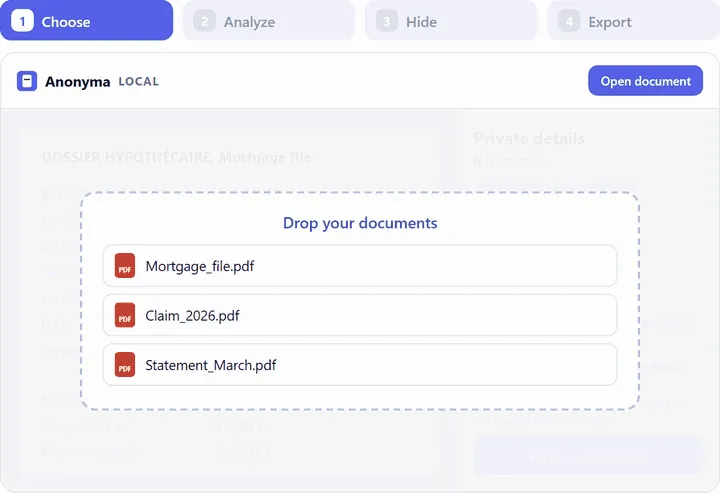
01Open your documents
A PDF, scan, Word, Excel or PowerPoint file, e-mail or image: everything is read on your computer.
 02
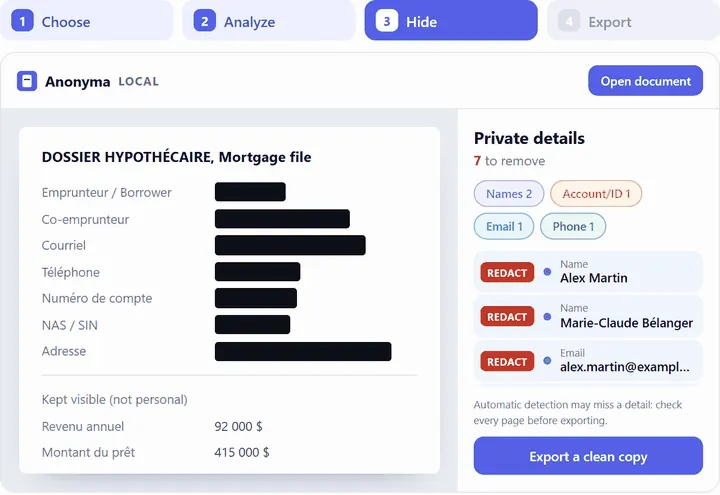
02Check every page
Anonyma suggests what to hide; you decide what is removed, page by page.
 03
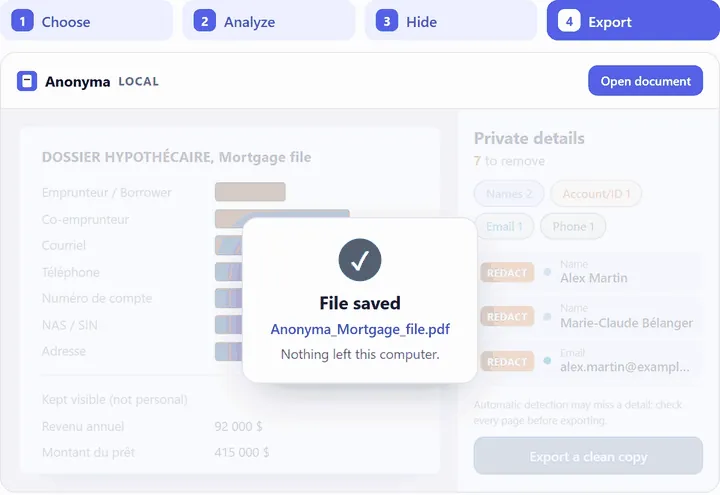
03Export a cleaned PDF copy
A new file, without the hidden text, saved on your computer.
Images: demonstration with fictitious data.
Limits to keep in mind
- Offline or not, automatic detection can miss things: review every page before you share the copy.
- Context can still point to a person: a place, a date or a job title can be enough.
Common questions
Can I work on a plane or without Wi-Fi?
Yes, if the licence was confirmed online in the last 7 days. Opening, analysing, reviewing and exporting work with no connection.
Does Anonyma use online AI?
No. The AI is part of the installed software and runs on your processor. Speed therefore depends on your computer: a scanned page can take from a few seconds to a minute.
What does Anonyma keep on my computer?
Your work sessions (file locations and box positions, never the hidden text), your settings and, with Pro and during the trial, learned rules, in your Windows profile. Learned hidden words are kept as fingerprints, not as readable text.
Try Anonyma on your own documents
Seven days free, no credit card, on one Windows 10 or 11 computer. For a team, let’s talk.
Plans and prices are on the Get a key page. Security and limits are described on the Security page.